|
TrialwareDialog ActiveX Control |
|
|
 |
|
Free Downloads |
|
Check out our free software downloads,
including our desktop calendar and a pair of
utility programs to help improve your work
flow. For software developers, we offer a
handy little tool that makes it easy for you
to create a trial version of your
application. We even have a great utility
for the M (MUMPS) developer to convert
Horolog format to "real" time.
More... |
|
|
|
Donate! |
|
Ten Mile Software
offers a number of software applications
free of charge. Help support free software
by making a donation through PayPal. It's
easy and secure! |

|
|
|
|

|
 |
|
|
|
|

|
|
|

|
|
|

|
|
 |
|
|
|
TrialwareDialog ActiveX Control |
|
 TrialwareDialog
ActiveX Control
is for software developers who are looking
for a simple way to implement a trial
version of their software product. The
TrialwareDialog
ActiveX Control works similar to the
Microsoft Common Dialog control and
simplifies the process of creating a trial
version of your product by exposing
properties and methods to create a simple
trial dialog window to display to your
users. TrialwareDialog
ActiveX Control
is for software developers who are looking
for a simple way to implement a trial
version of their software product. The
TrialwareDialog
ActiveX Control works similar to the
Microsoft Common Dialog control and
simplifies the process of creating a trial
version of your product by exposing
properties and methods to create a simple
trial dialog window to display to your
users.
Best of all,
TrialwareDialog
ActiveX Control is currently being offered as a
free download! Click
here to learn
how you can support our free software.
|
|
|
|
|
|
Features of
TrialwareDialog |
- Select from
two trial styles: number of days since first run
or number of total runs. You select the number
of days or runs by which to limit the trial.
- Display your
own company name, company web site URL, product
name, description, and version, and copyright
text on the trial dialog window.
- "Buy" button
allows you to interface the trial dialog window
with your own purchase/registration
methodology.
- Sensitive
data such as initial and last run dates and run
counters are encrypted for your protection.
Click
here to download a sample Visual Basic
project that shows you how to implement the
control (Visual Basic 6).
|
|
|
|
Screenshots of
TrialwareDialog |
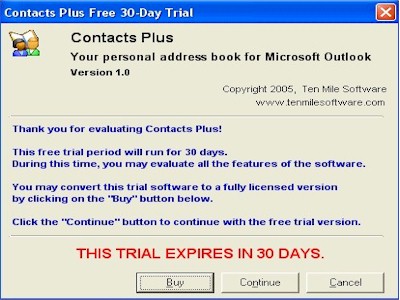 |
Set your
trial to run a specific number of days
|
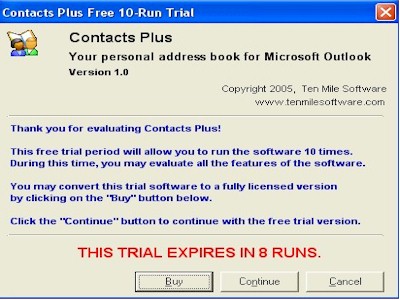 |
Set your trial to allow a
specific number of runs.
|
 |
|
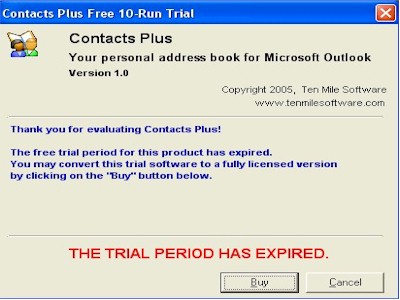
After the trial period has
expired, the application will no longer
open. |
|
|
|
| Support
Free Software |
We welcome donations in support of our free software
offerings. Your donations encourage us to continue
offering high-quality software free of charge. Just
click on the button below to make a donation through
PayPal.
When you click on the Donate button below, a new
PayPal window will open, where you can log in to an
existing PayPal account or sign up for a new one,
and quickly and securely complete your transaction.
|
|
|
|