|
PresbyCal Desktop Calendar |
|
|
 |
|
Free Downloads |
|
Check out our free software downloads,
including our desktop calendar and a pair of
utility programs to help improve your work
flow. For software developers, we offer a
handy little tool that makes it easy for you
to create a trial version of your
application. We even have a great utility
for the M (MUMPS) developer to convert
Horolog format to "real" time.
More... |
|
|
|
Donate! |
|
Ten Mile Software
offers a number of software applications
free of charge. Help support free software
by making a donation through PayPal. It's
easy and secure! |

|
|
|
|

|
 |
|
|
|
|

|
|
|

|
|
|
|
 |
|
|
|
PresbyCal Desktop Calendar |
|
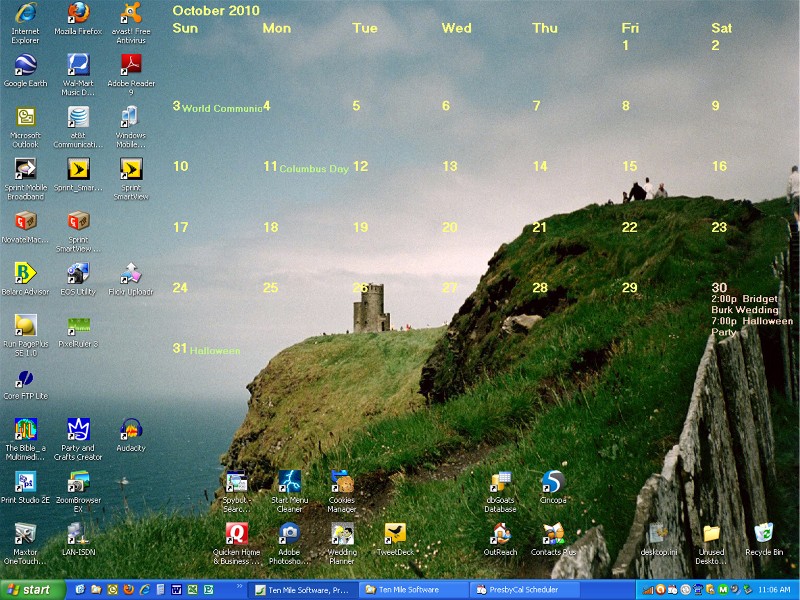
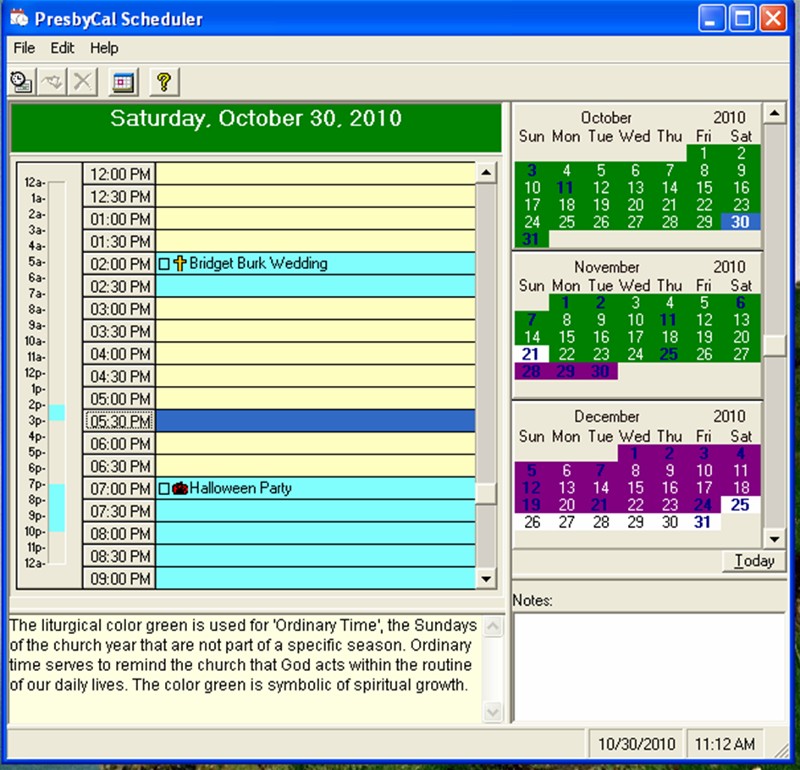
 PresbyCal Desktop Calendar
is a full-featured calendar and event
scheduling application based on the
liturgical seasons of the Christian church
year. It includes an onscreen calendar that
integrates into your desktop wallpaper for
easy viewing of your daily appointments, and
a scheduler for
events and appointments. The scheduler shows
the days of the week in their corresponding
liturgical color (based on the Presbyterian Church
(USA) liturgical calendar) and includes a short
description of the meaning of each day's color.
PresbyCal Desktop Calendar
is a full-featured calendar and event
scheduling application based on the
liturgical seasons of the Christian church
year. It includes an onscreen calendar that
integrates into your desktop wallpaper for
easy viewing of your daily appointments, and
a scheduler for
events and appointments. The scheduler shows
the days of the week in their corresponding
liturgical color (based on the Presbyterian Church
(USA) liturgical calendar) and includes a short
description of the meaning of each day's color.
We now offer PresbyCal as a
free download! Click
here to learn
how you can support our free software.
|
|
|
|
|
|
Features of
PresbyCal |
- Schedule
one-time events, recurring events, or all-day
events.
- Add
highlight colors and icons to each
event, as well as personal notes.
- Choose to
integrate the onscreen calendar into your
desktop wallpaper, or jut use the scheduler
application without the calendar.
- Options let
you configure the onscreen calendar to use a
background color or image, automatically
change the background image on a daily,
weekly, monthly basis, set calendar fonts and
colors to use, and set the calendar's
orientation.
- PresbyCal
sits in your system tray, so it's always just
a click away.
|
|
Screenshots of
PresbyCal |
 |
 |
|
Click image for larger view. |
Click image for larger view. |
|
|
Click
here for more
screenshots. |
|
|
| System Requirements |
- Microsoft
Windows 98, ME, 2000 or XP (Windows 7 version is
coming soon!)
- At least 2 MB free disk space
- Screen resolution: 800 X 600 or greater.
If you
install PresbyCal and receive the following or
a similar error:
Error
-2147024770. Automation error. The specified
module could not be found.
then you may need to install the latest
version of the Microsoft Data Access
Components (MDAC). Download the MDAC for free
here,
install it on your computer, then restart your
computer.
|
|
|
|
Download the Free
Annual Update |
|
Update for the
2012 liturgical church year is available. If you already have
PresbyCal, click
here
for information about the update, including
instructions for installing it on your computer.
|
|
|
| Support
Free Software |
We welcome
donations in support of our free software offerings.
Your donations encourage us to continue offering
high-quality software free of charge. Just click on
the button below to make a donation through PayPal.
When you click on the Donate button below, a new PayPal window will open, where you
can log in to an existing PayPal account or sign up
for a new one, and quickly and securely complete
your transaction.
|
|
|
|